FREE TOOL FOR ANYONE WITH A WORDPRESS SITE
My site got hacked twice this year. This is the Claude skill I built so it does not happen a third time to me or to the sites I look after.
Most small businesses and nonprofits have a WordPress site that somebody set up a while ago, and nobody is watching it. Plugins drift out of date, a password leaks, and one morning Google says the site is dangerous or it just stops loading. The WordPress Security Check skill gives Claude a checklist and a set of rules so it can watch your site for you: signs of a break-in, newly disclosed vulnerabilities in the plugins you actually run, and, if you want, safe updates with a test afterwards.
It is free, it is a plain text file you can read and it does not install anything on your website.
Works with Claude in the app or in Claude Code. MIT license. Provided as-is, see the note under “Why the testing step matters”. Jump to the install steps.
What it does
Sets itself up by asking you
The first time, Claude interviews you: who hosts the site, which pages matter most, how it is allowed to connect. It walks you through creating a separate password for itself that you can revoke any time. Then it writes a profile of your site and reads it every time after, so you only explain things once.
Looks for a break-in
Plugins you did not install, administrator accounts you did not create, hidden links and injected scripts, spam words, redirects to someone else’s domain, settings that changed. Read-only. It tells you plainly what it checked and what it could not see.
Watches for new vulnerabilities
Checks the latest disclosures from Wordfence, Patchstack and WPScan, the three services that track WordPress plugin security problems, against the exact plugin versions your site runs, and tells you which one to update, how urgently, and whether a fix exists yet.
Updates, then tests
Optional. Backup first, one update at a time, your key pages checked before and after, cache cleared, and a rollback if something breaks. It refuses to update a site that looks compromised.
What it will not do
Claude can see what WordPress reports: plugins, themes, users, settings, pages, and the live code of your site. That catches most problems. Malware can hide from WordPress. It cannot hide from the file system, and the deeper file checks need hosting access (SFTP or your host’s file manager), which most people do not hand over on day one. So a “clean” report from this skill always says what it covered and what it skipped. It will never tell you your site is secure, because nothing honest can.
It also carries the runbook for the bad day: what to preserve, what to shut off, which passwords to change in which order, and what to write down so the next time is faster.
Install it in about ten minutes
1
Download the zip
Keep it zipped. Inside are three plain text files: SKILL.md, which is what Claude reads, a README with these same steps, and the MIT license. Open the SKILL.md in any text editor if you want to see exactly what Claude will and will not do. It is written for people, not programmers.
2
Add it to Claude
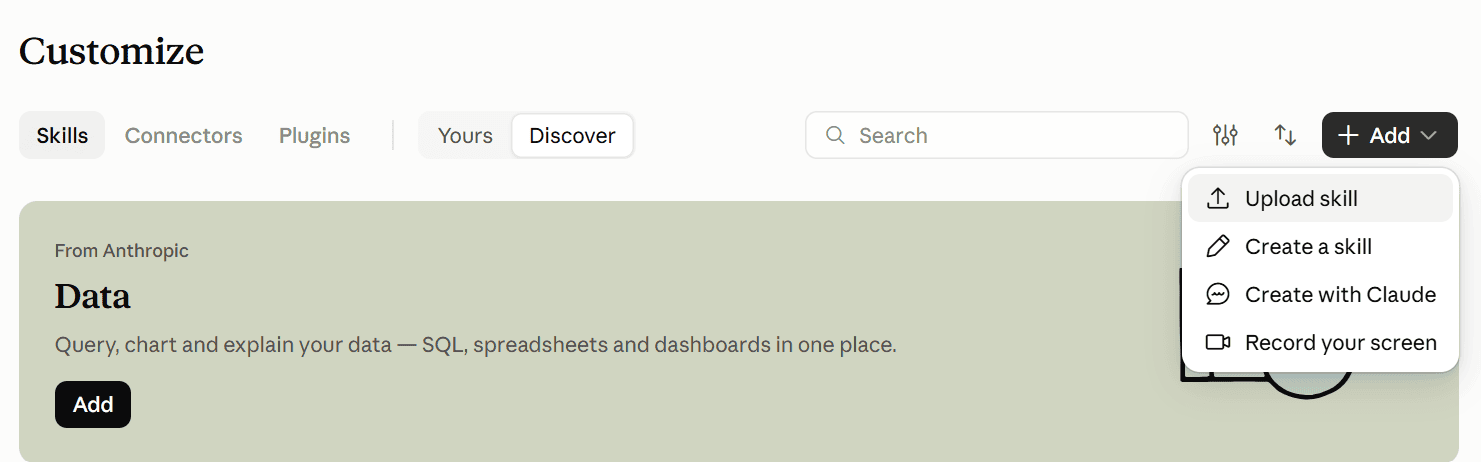
In the Claude app (desktop or claude.ai): open Customize, find Skills (on some plans it sits under Customize), and click +Add upload the zip file exactly as you downloaded it (do not unzip it). In Claude Code: unzip it, put SKILL.md in a folder named wordpress-security-check, and place that folder in .claude/skills/ in the folder you work from, or into ~/.claude/skills/ to have it everywhere.
Nothing gets installed on your website in this step. You are only teaching Claude the procedure.
3
Have the setup conversation
Start a new chat and say:
I have a WordPress site at example.org. Set it up so you can watch it for hacks.
Claude does not hand you a form. It asks a few plain questions at a time, in roughly this shape:
Claude: Happy to. Three quick things first. Who hosts the site? GoDaddy, IONOS, Bluehost, or "not sure" is fine, I can check. What does the site do for you, and which pages would hurt most if they broke? And is there a developer or agency who still has access?

You: GoDaddy I think. It is our nonprofit's site. The donate page and the events calendar matter most. Nobody else has access anymore.

Claude: Got it. Next, how I connect. The simplest safe option is an Application Password, a separate password just for me that you can revoke any time. Want me to walk you through creating one? It takes about a minute.
From there Claude walks you, one step at a time, through creating an Application Password in WordPress (Users, then Profile, then Application Passwords). That is a separate password Claude uses to read your site. It is not your login. If you ever worry about it, you revoke it on that same screen and nothing else breaks. Claude will tell you where to keep it: one local file on your computer, never in a document, an email, or a shared drive. At the end it writes a profile of your site (no passwords in it) and reads that first every time after.
4
Run your first check
Run a security check on example.org.
You get a report that leads with the answer: clean, or look at this, with evidence and the next step in plain words, plus a list of what was skipped and why. If your plugins are behind, it will tell you which updates are security fixes and which can wait.
5
Put it on a schedule
The skill includes two ready-to-use prompts: a daily read-only hack check, and a weekly run that applies updates and tests the site. Paste one and ask Claude to schedule it:
Schedule this to run every morning at 7am. Give it access to the folder where my site profile and secrets file live.

Run the wordpress-security-check skill, Parts 2 and 3 only, for every site in wp-sites/. Read-only: make no updates or changes to any site. If every site is clean and nothing matches, reply with one line: "WordPress daily check: all sites clean." If anything is "look at this", a site is down, or a vulnerability matches, send me the full report titled "URGENT: WordPress hack check" with evidence and next steps. Do not attempt fixes.
Two things to know. Scheduled tasks run on their own, so Claude needs to be able to reach your site profile and secrets file when it runs; it will ask for the folder. And keep the daily task read-only. The weekly update task is the one that changes things, and it should only run once you have seen a few clean weekly reports and trust what it does.
Why the testing step matters
If a site has not been updated in a long time, updating it can break it. A plugin that is three major versions behind, a theme nobody has touched since 2022, or a server still running an unsupported version of PHP will not always survive a round of updates quietly. That is not a reason to leave it alone; an old site is exactly the kind that gets hacked. It is a reason to update carefully.
The skill’s update procedure is built around that:
- A backup you can restore comes first. No backup, no updates. Host backups or a plugin like UpdraftPlus both count, as long as someone has actually tried a restore once.
- It records what your key pages look like before (home, contact, donate, events, whatever you named in setup) and checks them again after every single update, not just at the end.
- One update at a time, security fixes first, the page builder and its add-ons together, everything else after. When a page breaks you know exactly which update did it.
- If something breaks, it rolls that one plugin back and tells you, rather than pushing on.
- PHP upgrades are flagged, not done. Those happen in your host’s control panel and deserve their own careful pass, because an old site can depend on behavior that newer PHP removed.
- It clears the cache at the end, because on most hosts a page can look unchanged, or broken, for hours after an update until the cache is flushed.
If you have not updated in a year or more, do the first round yourself with Claude in the chat rather than on a schedule, or let me do it (below). Once the site is current, the weekly run is boring, which is the point.
Provided as-is. This skill is free, with no warranty of any kind and no support. It is a set of instructions for an AI assistant, and AI assistants make mistakes: they can miss a problem, misread a result, or break a page. Use it at your own risk. Before you let Claude change anything on a live site, have a backup you have tested restoring, read the ground rules at the top of the skill, and keep “report first, I approve changes” on until you trust it. Crys Black and Crys Black Consulting are not responsible for any loss, downtime, data loss, or damage arising from its use. If your site is already compromised and it matters to your organization, hire someone. This is a flashlight, not a fire department.
Would you rather I did it?
I set it up, run the first round, and keep watch
Setup and first clean round
One site. Interview, credentials, full security check at file level, all updates applied and tested, hardening turned on, backups verified, written profile and report. Usually done inside a week.
Watch
Daily hack check and vulnerability watch, weekly updates with testing, a monthly one-page summary, and me on the other end when something is flagged. Up to one hour of fixes a month included. Cancel any time.
Already hacked
Evidence preserved, site contained and cleaned, every credential rotated in the right order, entry point traced where the logs allow, hardening, and a plain-language incident write-up you can give your board or your host.
Some people read the steps above and think “I can do that this afternoon.” Some think “I do not have an afternoon.”
This is for the second group. I do the interview, create and store the credentials properly, run the full check including the file-level checks WordPress cannot see, bring the plugins and PHP current one careful step at a time with the site tested after each, turn on the right hardening, and hand you a site profile you own. Multiple sites, an agency, or a membership group that wants a workshop on this instead? Ask. Group pricing exists.
No. It reads your site the same way the WordPress mobile app does, through the built-in connection WordPress already has, using a password you create for it. A security plugin like Wordfence or WP Defender is still a good idea, and the skill will recommend one, but it is not required to get started.
An Application Password is separate from your login and can be revoked in one click without changing anything else. The skill’s rules are that it is stored in one local file on your computer, never written into a document or a chat you share, and never put into a scheduled task’s instructions. If you ever think it leaked, revoke it and make a new one. Treat it with the same care as your login, because it can do most of what your login can.
It stops, tells you what it found with evidence, and does not try to fix it on its own. The skill includes a step-by-step runbook for cleanup that you can follow with Claude in the chat, or you can send me the report.
Any host that runs standard WordPress over HTTPS. GoDaddy, IONOS, Bluehost, SiteGround, WP Engine, Kinsta, Hostinger all work. A few hosts block the password connection by default (IONOS is one; the skill knows the fix). Managed hosts that update WordPress for you still benefit from the hack check and the plugin vulnerability watch, which they do not do.
The checks work anywhere Claude can read the skill. Scheduled runs need somewhere to keep your site profile and secrets file between runs, which means the desktop app with a folder connected, or Claude Code. If you are app-only, run the check by hand once a week; it takes a minute of your time.
Looking for the other free tools? The AI Priority Finder and the AI Findability Scan are here too.